Storage: yours or ours
Write backups to storage you own at no storage charge, or to BackupVision360 managed storage, locked and encrypted in the region nearest your data.
Online version, always current: https://cloudvision360.com/docs/backupvision360/storage/
Backups are chunked, encrypted and packed before they are written, so a storage target only ever holds ciphertext. You choose where that is: storage you own, or ours.
Bring your own storage
Add a target under Storage → Targets → Add a target:
- Azure Blob Storage, Amazon S3 and S3-compatible storage, Google Cloud Storage
- A NAS or file share, or a local folder
There is no storage charge for your own storage: you pay your provider directly. Credentials are encrypted when saved and never shown again. Each target reports its lock status (S3 Object Lock, Azure immutable blobs, GCS bucket lock), and Test checks that BackupVision360 can still write and read. Once a target holds restore points, its location and key custody are frozen, so backups can’t be quietly redirected.
The Free plan allows one storage target; paid plans have no limit.
BackupVision360 managed storage
If you have no bucket, or don’t want to run one, choose Use BackupVision360 storage on the Targets page. You get a dedicated location for your organization on our Azure, never a shared container.
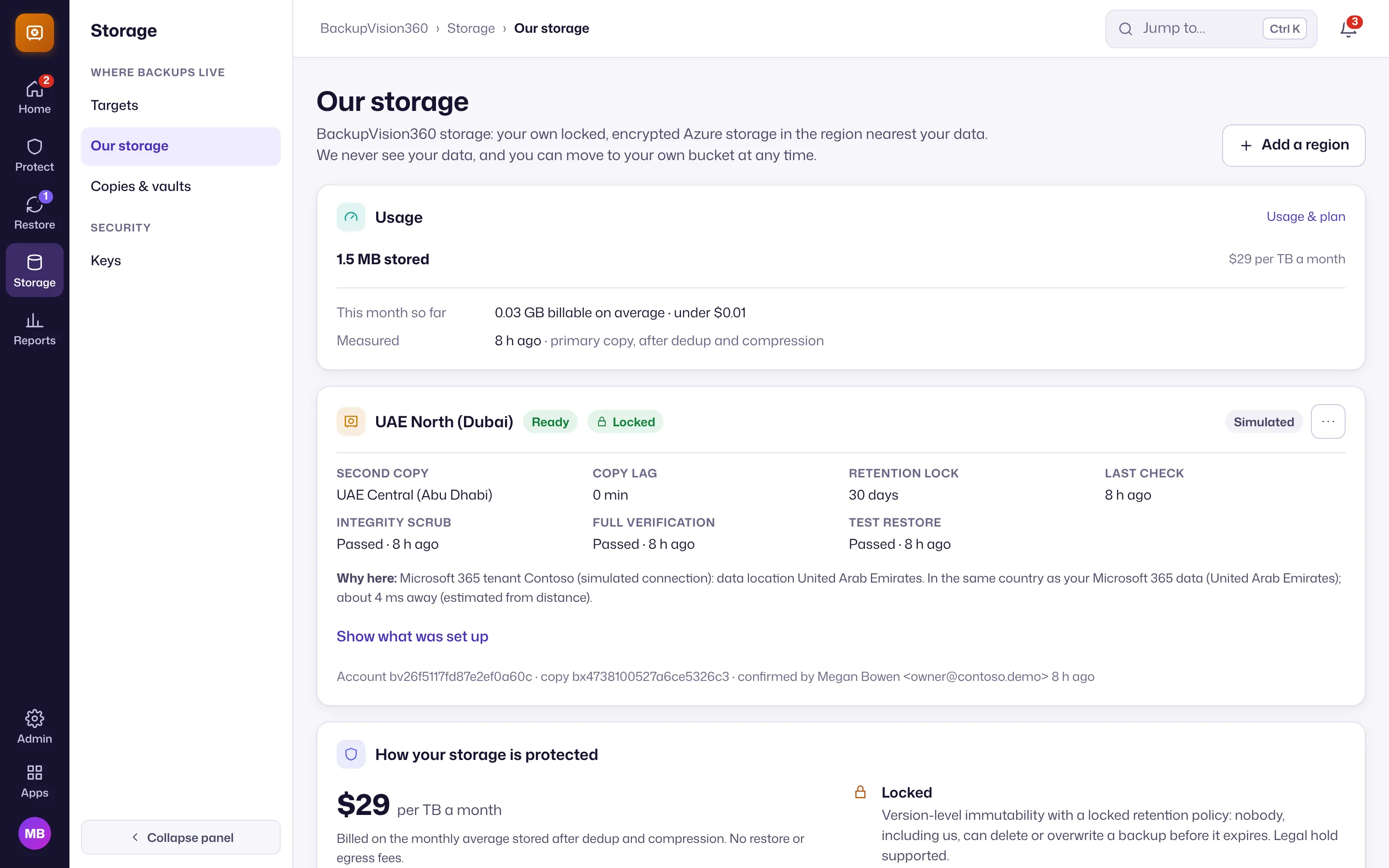
- Per customer. Its own storage accounts, encryption scope, Key Vault key, locked policy and scoped credentials.
- Same or nearest region. BackupVision360 recommends a region from where your data lives (your Microsoft 365 tenant’s country, your cloud accounts’ regions, your own country): the same country first, then the same residency area (the EU/EEA counts as one), then the nearest region only with your consent. You confirm the choice.
- Locked. Version-level immutability with a locked retention policy: nobody, including you, our staff or our application, can delete or overwrite a backup before it expires. Retention can be extended, never shortened.
- Two regions. Three availability zones in the primary region, plus a locked second copy in a paired region inside the same jurisdiction. Where a country has only one Azure region, the second copy goes elsewhere only with your consent; without it, the location stays in one region and says so.
- Encrypted before it is written. Your data is encrypted under your organization’s keys before it reaches the container, and Azure encrypts it again at rest. Our storage only ever holds ciphertext.
- Checked. A weekly integrity scrub, a monthly full verification and a monthly test restore into a sandbox that keeps nothing. Results are under Reports → Storage checks, and a failure raises an alert.
- No lock-in. You can copy everything to your own bucket at any time. That export is a four-eyes change and can’t be started by service-provider staff.
Price and what is included
Managed storage is coming soon: until it opens, back up to your own storage. It will cost $29 per TB per month, billed on the monthly average stored after deduplication and compression. No restore or egress fees. The Free plan includes 10 GB; paid plans include none unless your contract says otherwise. At 80% and 100% of what is included, owners get a notice; on Free, new backups to managed storage pause at 100% and nothing is deleted. Paid plans never pause.
Keys
Storage → Keys shows who holds the keys for each target.
- Your organization’s key (default). Sealed by a BackupVision360 master key. Anyone with only the storage sees ciphertext, but our systems hold what it takes to unwrap it. Restores need your approval, and every restore, approval and key change is in your audit trail.
- Your own KMS key (Business and up). A key in AWS KMS, Azure Key Vault or Google Cloud KMS wraps the target’s key instead. Every use shows in your KMS logs, and revoking access makes the backups unreadable to us within minutes. That also stops restores, by design.